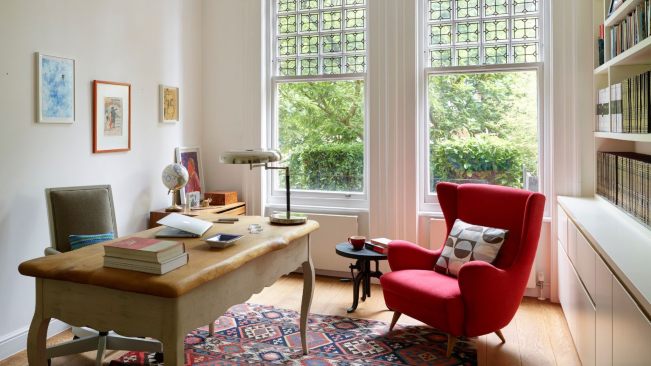

With remote work and online business becoming more common, having a well-designed home office is no longer a luxury—it’s a necessity. A properly planned workspace can significantly improve productivity, focus, and overall work satisfaction. Whether you are a freelancer, student, or full-time remote employee, your environment plays a major role in how efficiently you work.
A home office should balance comfort, functionality, and organization. It doesn’t need to be expensive or large, but it must support your daily tasks without distractions.
Choosing the Right Space for Your Home Office
The first step in creating an effective home office is selecting the right location. Ideally, you should choose a quiet area in your home where interruptions are minimal. This could be a spare room, a corner of your bedroom, or even a section of your living room.
Natural light is an important factor when selecting your workspace. A well-lit area improves mood, reduces eye strain, and increases productivity. Positioning your desk near a window can make a significant difference in your daily energy levels.
If a separate room is not available, you can still create a dedicated workspace using dividers, shelves, or rugs to define your office area. The key is to mentally separate work space from relaxation space to maintain better focus.
Noise control is another important consideration. If your environment is noisy, using noise-canceling headphones or choosing a quieter corner can help improve concentration.
Essential Furniture and Ergonomic Setup
A productive home office starts with the right furniture. The most important piece is your desk and chair. These should support long hours of work without causing discomfort.
An ergonomic chair is essential for maintaining good posture. It should provide proper lumbar support, adjustable height, and comfortable seating. Sitting in an incorrect position for long periods can lead to back pain and fatigue.
Your desk should be spacious enough to hold your computer, documents, and other essentials without feeling cluttered. Adjustable desks are also a great option, allowing you to switch between sitting and standing positions during work.
Monitor placement is another key factor. The screen should be at eye level to reduce neck strain. Using a laptop stand or external monitor can help achieve this setup.
Small additions like footrests, wrist supports, and adjustable lighting can further enhance comfort and reduce physical stress during long working hours.
Organizing Your Workspace for Maximum Productivity
An organized workspace leads to a clear and focused mind. Clutter can easily become a distraction and reduce efficiency, so keeping your office neat is essential.
Start by minimizing unnecessary items on your desk. Keep only the tools you use daily within reach. Use storage solutions such as drawers, shelves, and organizers to store documents, stationery, and equipment.
Cable management is often overlooked but plays an important role in maintaining a clean setup. Using cable clips or organizers prevents tangled wires and creates a more professional-looking workspace.
Digital organization is equally important. Keep your computer desktop clean, organize files into folders, and remove unused applications. A clutter-free digital environment improves workflow and reduces stress.
Adding personal touches like plants, artwork, or motivational quotes can make your workspace more enjoyable without creating clutter. A balanced environment improves creativity and focus.
Enhancing Productivity with Lighting, Technology, and Design
Lighting has a direct impact on productivity and mood. Natural light is ideal, but if that is not available, using warm LED lighting can create a comfortable working atmosphere. Avoid overly harsh or dim lighting as it can cause eye strain and fatigue.
Technology also plays a major role in a home office setup. A reliable computer, fast internet connection, and essential software tools are necessary for smooth workflow. Depending on your profession, additional tools like printers, scanners, or dual monitors may be helpful.
Smart devices such as voice assistants or smart lighting systems can further improve convenience and efficiency. They help automate simple tasks and reduce distractions.
The design of your office should reflect simplicity and focus. Minimalist setups are often more effective because they reduce visual distractions. Neutral colors like white, grey, or beige can create a calm and professional environment.
Ventilation is another important aspect. Fresh air improves concentration and prevents fatigue during long working hours. If possible, ensure your workspace has proper airflow or occasional access to outdoor air.
Building Long-Term Work Habits in Your Home Office
A well-designed office is only effective if paired with strong work habits. Creating a routine helps maintain discipline and productivity while working from home.
Start your day at a fixed time and maintain a consistent schedule. This helps train your brain to enter “work mode” at specific hours. Taking regular breaks is also important to avoid burnout and maintain focus throughout the day.
Setting clear boundaries between work and personal life is essential. When your workday ends, step away from your desk to mentally disconnect. This prevents overworking and improves overall well-being.
Time management techniques such as task lists or productivity methods can help you stay organized. Prioritizing important tasks ensures that you complete high-value work efficiently.
Finally, regularly reviewing and updating your workspace can keep it aligned with your needs. As your work evolves, your office setup should also adapt to support better performance.
A well-planned home office is more than just a physical space—it is a productivity system that supports your goals, focus, and long-term success.